
Accessing Gemini / Google AI Studio with a Dedicated Worker
Where It All Started
Cloudflare's default Worker (the Default mode in Placement settings) always picks the nearest Cloudflare data center to the end user to minimize latency. For a user connecting from Iran, this means execution near Azerbaijan, Turkey, Germany, Sweden, or Finland — not the US.
Here's the problem: some services (like Google AI Studio / Gemini ) only respond to requests coming from a specific geographic region (primarily the US). When the Worker always executes near Europe, these services won't load.
The solution: create a separate Worker whose Placement is manually locked to a Google Cloud Platform region (e.g., the US), so that Cloudflare's code execution itself happens from a data center closer to that region.
What Exactly Is Placement on Cloudflare Workers?
According to Cloudflare's official documentation, there are three modes:
| Mode | Best For |
|---|---|
| Default (Off) | The Worker runs in the nearest data center to the end user; lowest latency for the user's own connection |
| Smart | Cloudflare automatically detects which fixed backend the Worker connects to most based on traffic, and runs it near that backend |
| Region | You explicitly specify a region from AWS, GCP, or Azure (e.g., gcp:us-east4); Cloudflare runs the Worker in its nearest data center to that region |
Note
Smart and Region are designed for when the Worker connects to a fixed backend/database/API (single-homed) and you want to shorten the round-trip between the Worker and that backend.
Why the Main Worker (VLESS/Tunnel with Variable Destinations) Should NOT Enable This
The main code and config (VLESS on Serverless) has no fixed backend — this week it's Telegram (Netherlands/Finland servers), next week Instagram (Germany/Austria/US), or an embassy website (Poland/Australia). The destination changes every moment, and there's no fixed database or API in the code.
For such a use case:
- Smart and Region offer no benefit — because there's no fixed backend to get closer to
- Worse, they might route the Worker to a data center farther from the end user, worsening latency
- The only factor that actually matters for this use case is the distance between the user and the Worker (handshake speed and initial round-trip), not the distance between the Worker and some "backend"
So the main Worker should stay on Default.
Recommended Worker Code
FOR THIS USE CASE the following code and repository is recommended as the Worker:Repository Link:
Project Documentation Link:
The Solution: A Second, Separate Worker — Only for US/GCP Destinations
Instead of changing the main Worker's settings, create a completely separate Worker whose Placement is set to Region on GCP, and use it only for destinations you know are US-based or only respond to the US (like Google AI Studio). Give it a name like only-GS Only Google Studio so it doesn't get confused with the main Worker — because for other destinations (besides these specific ones), this second Worker is useless.
Step-by-Step Instructions (Based on the Cloudflare Dashboard)
- Log in to the Cloudflare dashboard → Workers & Pages → the desired Worker (or create a new one) → Settings tab → Runtime section.
Click on the
Placementfield and change it from Default to Region.The Provider field will appear — make sure to set it to
Google Cloud PlatformGCP (this field is mandatory, not optional).The
Location/Regionfield comes next — this one is optional; you can select one or more regions (e.g., Central, US East) or leave it empty to let Cloudflare pick the best option.
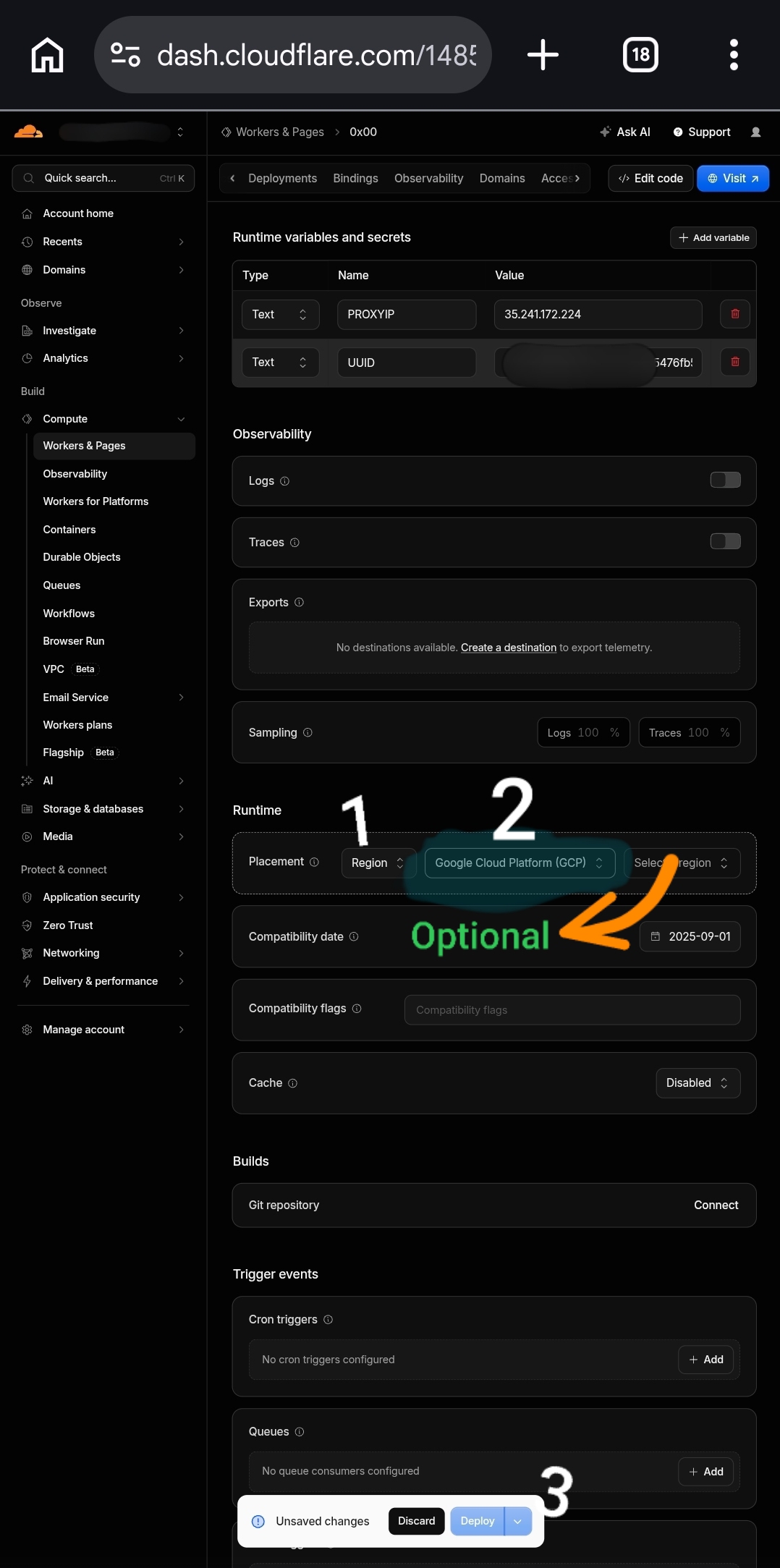
Click
Save and Deploy(the same Deploy button at the bottom of the page that, after changing settings, shows an "Unsaved changes" message instead of the usual text).Update your Subscription once.
Create a new config whose domain is exactly this Worker (not the default Worker), and connect with it.
Now try Google AI Studio / Gemini — it should normally load.
Recommendation
To avoid v2rayNG client bugs and also benefit from the pattern parameters Final mask and Cypher suites, I recommend using the v2ray-Enhanced subscription link from the zizifn panel inside the PattNG client. The frequent disconnections and low upload speed issues will be completely resolved.
Why Does This Actually Work? (Additional Explanation)
According to Cloudflare's official documentation, in Region mode, the Worker code execution itself takes place in the Cloudflare data center with the lowest latency to the selected cloud region (here, GCP) — meaning this data center is genuinely geographically closer to that region (e.g., the US). When this Worker makes an outbound request to Gemini/Google AI Studio, the outbound IP comes from that same US Cloudflare data center, not the European/near-Iran data center that would be chosen in Default mode. Since these services typically decide whether to respond based on the geographic location of the incoming IP, this change is exactly what's needed.
Important Note
Cloudflare officially advertises this feature for "reducing latency to a specific backend," not for "changing the geographic location of a request"; meaning this is a side-effect of a performance feature, not an official or guaranteed capability for bypassing geo-restrictions. Cloudflare may change the internal behavior of this feature in the future.
Summary and Final Recommendation
- Main Worker (tunnel/browsing with variable destinations): keep Placement on Default
- Second, separate Worker (only for US/GCP destinations like Gemini): set Placement to Region → Google Cloud Platform, location optional, name it something like
only-GSto make it clear it's only for this purpose - For the code of this second Worker, use the recommended repository [1].
- Keep this second Worker as a separate, additional config — not a replacement for your daily config.
Support and Help
Further Assistance
If you encounter any questions or issues during setup or while using this project, you can reach out through the following channels:
Direct Contact: My personal Telegram account
General Q&A: Telegram support group