
Check-Host-API
What is this project?
A FastAPI (Python) service that uses the global nodes of check-host to test the accessibility of a host from any country you want — with five test types: ping, http, tcp, udp, dns.
This service is the exact backend that the "Check-Host Network Test" tab in the Cloudflare-Scamalytics project connects to.
Compatibility with the Cloudflare-Scamalytics project's Worker
The Cloudflare-Scamalytics repo directly calls this service's Legacy route (GET /{country}/{host}) and has hardcoded its address to https://check-host.onrender.com. This repo has intentionally been kept compatible with it:
- Every ping result includes a
ping_msfield (the Worker frontend reads exactly this key to display each node's latency) - Every error response includes both
detailandmessagefields (the Worker reads themessagevalue so it can show the real error message to the user instead of a generic "HTTP 502" error) - CORS is completely open (
Access-Control-Allow-Origin: *) because this API is public and read-only
If you deploy this API under an address other than check-host.onrender.com, you need to update the constant value CH_RENDER_API_BASE in that same Worker's _worker.js file to match the new address.
Technical section
fastapi>=0.110
uvicorn[standard]>=0.29
httpx[http2]>=0.27All the logic and functions are written in a single file (api/index.py); no database or heavy dependencies.
Endpoints (Routes)
Check with a specified type
GET /api/{check_type}/{country}/{host}check_type: one ofping,http,tcp,udp,dnscountry: a 2-letter country code (e.g.de) orallfor all nodes — required, no default value- Example:
/api/ping/de/example.com
Optional Query parameters:
| Parameter | Range | Default | Description |
|---|---|---|---|
max_nodes | 1 to 50 | unlimited | Maximum number of nodes used from that country |
timeout | 3 to 60 seconds | 15 seconds | Maximum wait time for results from all nodes to be collected |
Check all types at once
GET /api/full/{country}/{host}Runs all 5 test types in parallel. Example: /api/full/all/example.com
List of countries
GET /nodesReturns a list of all available country codes, read live from check-host.net/nodes/hosts and cached in memory.
Legacy routes
GET /{country}/{host}
GET /check/{country}/{host}Always run a ping test (kept only for backward compatibility with previous versions — this is exactly what Cloudflare-Scamalytics uses).
Query String form
GET /?host=<host>&country=<country>&type=<check_type>Equivalent to /api/{type}/{country}/{host}; here too, country is required — not providing it returns a 400 error. If opened without the host parameter, it just returns a usage guidance message.
Response structure
The response of /api/{check_type}/{country}/{host} looks like this:
{
  "check_type": "ping",
  "host": "example.com",
  "country": "de",
  "is_accessible": true,
  "nodes_checked": 3,
  "elapsed_seconds": 2.14,
  "details": {
    "de1.node.check-host.net": { "status": "OK", "ping_ms": 24.5, "...": "..." }
  },
  "nodes_meta": { "...": "..." },
  "report_url": "https://check-host.net/check-report/<request_id>"
}The fields inside details differ depending on the test type:
| Type | Key fields |
|---|---|
ping | status, sent, received, loss_percent, ping_ms, ping_ms_min, ping_ms_avg, ping_ms_max |
http | status, http_code, http_message, code_display, response_time_s, ip |
tcp / udp | status (OK/FAIL/FILTERED for timeout), ip, time_s or error |
dns | status, ips (list of A/AAAA records), ttl |
If a node doesn't respond within the timeout period, status: "TIMEOUT" is returned for that node; the whole request doesn't fail, only that node.
Caching
The list of countries/nodes is cached in memory for 6 hours so that not every request hits check-host.net directly; it automatically refreshes after 6 hours.
Prerequisites
- No environment variables needed at all — this service works completely config-free.
- Python 3 (for local execution or self-hosting)
Running locally
python -m venv venv
source venv/bin/activate     # windows
venv\Scripts\activate
pip install -r requirements.txt
uvicorn api.index:app --reload --port 8000Interactive API documentation is available at http://localhost:8000/docs.
Deployment guide
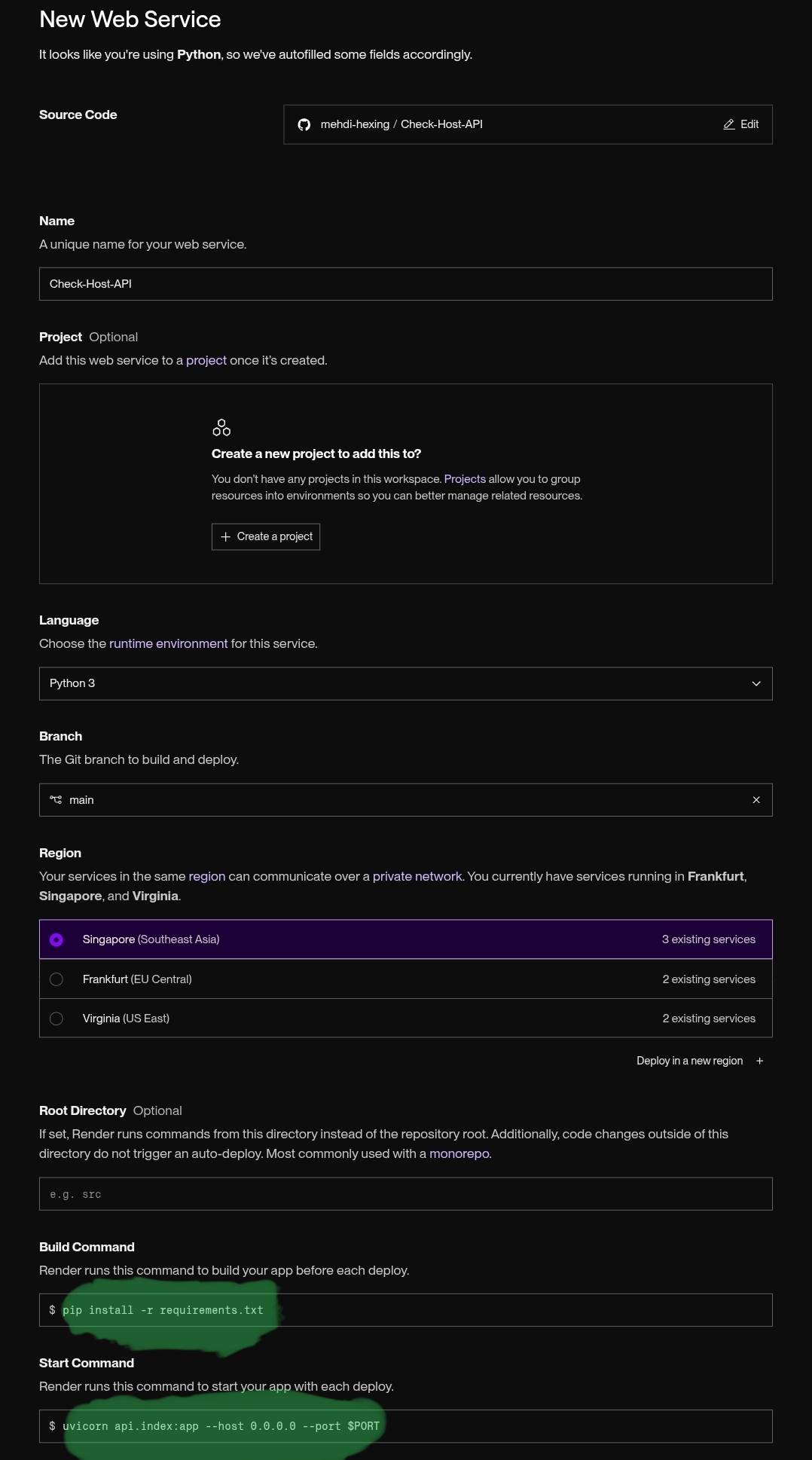
On Render Render
Fork this repo or copy its link to connect it to Render in the Web Service section.
Settings: Build Command: pip install -r requirements.txtStart Command: uvicorn api.index:app --host 0.0.0.0 --port $PORT
For the server plan, choose the Free plan.
On Vercel Vercel
This repo also has a vercel.json (which routes all paths to api/index), so it can also be deployed directly by connecting the repo to Vercel, with no extra configuration.
On any other Python host (without Docker)
pip install -r requirements.txt
uvicorn api.index:app --host 0.0.0.0 --port 8000 --workers 2If you need HTTPS and a custom domain, put it behind Nginx or Caddy.
A Note
country has no default value anywhere; every request must explicitly provide a country code (or all)
Troubleshooting
- HTTP 502 error: usually because of rate-limiting by check-host.net itself — since this service has to apply rate limits to avoid overloading its nodes. Try again a few minutes later; the maintainer of this project is looking for a way to improve this
- A node always returns
TIMEOUT: either that node is temporarily unreachable, or the requestedtimeoutvalue is shorter than what that node needs — try with thetimeoutparameter (up to 60 seconds) /nodesreturns an empty or outdated list: the 6-hour node cache hasn't refreshed yet; wait a few hours or restart the service
Related links
- This service's repo:
https://github.com/mehdi-hexing/Check-Host-API - The project that uses this service:
https://github.com/mehdi-hexing/Cloudflare-Scamalytics