
ProxyIP-Tel-Bot
What is this project?
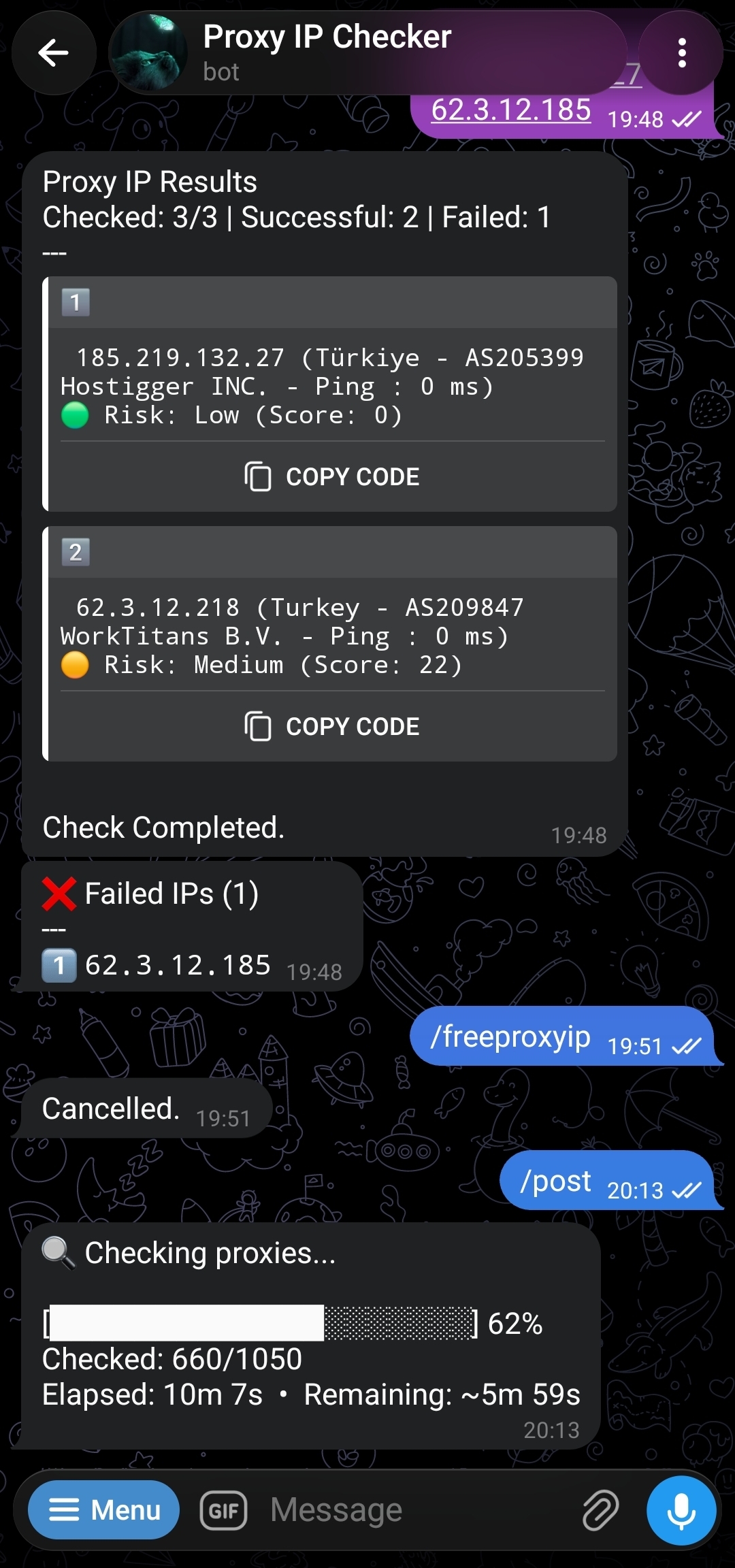
A Telegram bot (Python) for testing proxy IPs — a single IP, a range, all IPs behind a domain, or a list from a file — that returns results with full detail (latency, country, risk score).
Architecture
Three separate components working together:
| Component | Role |
|---|---|
| Backend API (Python) | Performs only the raw TCP connection test; deployed on Render or your own server. |
| Cloudflare Worker | The heart of the system; the bot's main endpoint. For each proxy, it tries every address in apiUrls and a direct TCP test from the Worker itself in parallel — whichever responds successfully first is accepted. It only fails when all of them (every Backend API plus the direct TCP check) fail. |
| Telegram bot (Python) | The user-facing part; runs on your own server and talks to the Cloudflare Worker. |
User → Telegram Bot → Cloudflare Worker → ( Backend API (Render/Server) + Cloudflare-Scamalytics API )Important Note
This bot's Worker first tries to get a risk score from the official Scamalytics API (using a real username and key, if configured). If those variables are never set, or the official API errors out, the quota runs out, or it returns an invalid response, the Worker automatically switches to the project's own public mirror of Cloudflare-Scamalytics (the same cloudflare-scamalytics.pages.dev documented elsewhere). Even geolocation/ISP data has the same fallback: first ip-api.com, then the same mirror. In other words, signing up for Scamalytics is optional — the bot works fine without any Scamalytics account; the risk score is just slightly less precise, since it comes from the public mirror rather than your own dedicated account.
Features
- Multiple test modes:
/proxyip(single/multiple IPs),/iprange,/domain,/file(from a file URL) - Free proxies:
/freeproxyipwith a sorted, three-column country menu (source: a separate public repo)
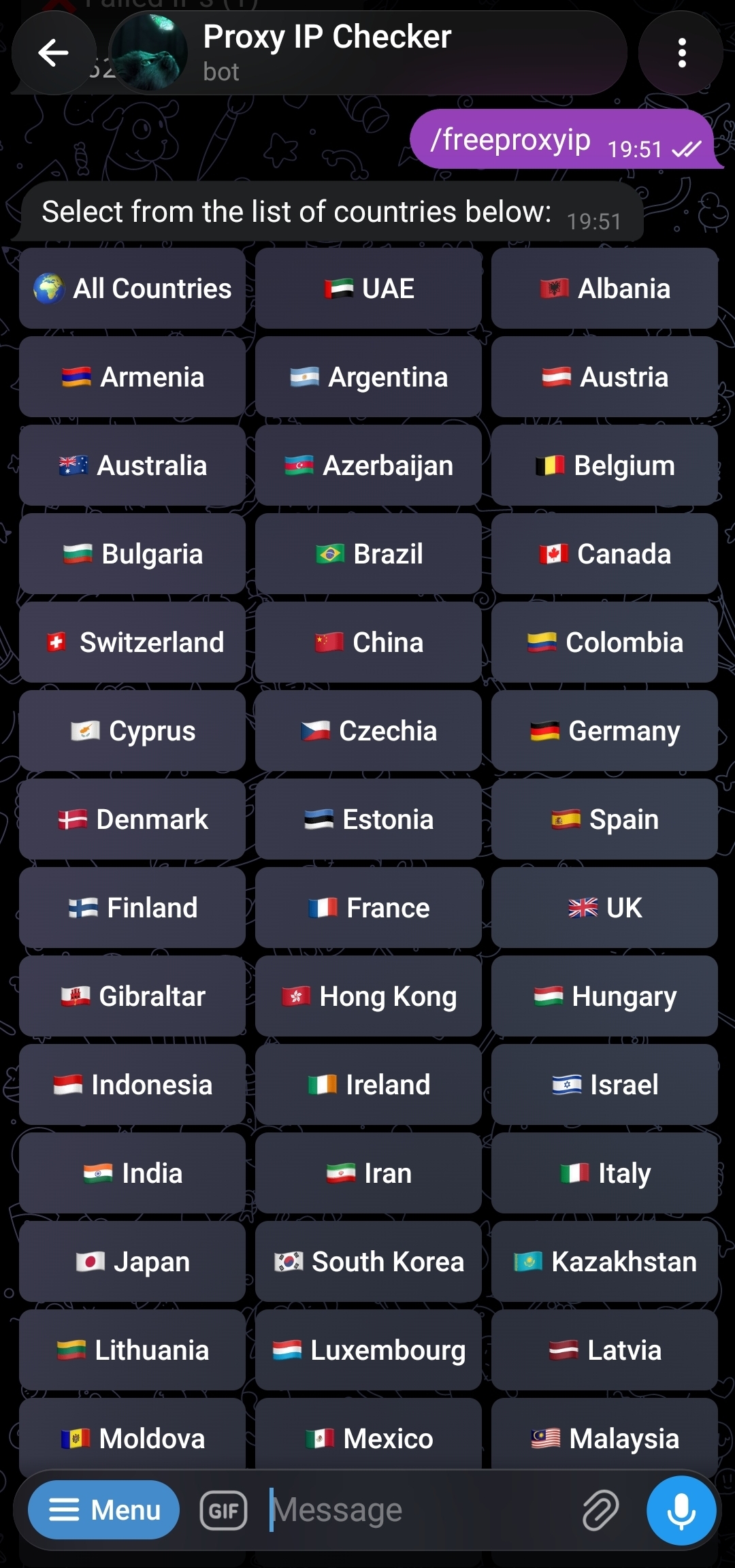
- Interactive live testing: the result message updates live, with Pause / Resume / Cancel buttons
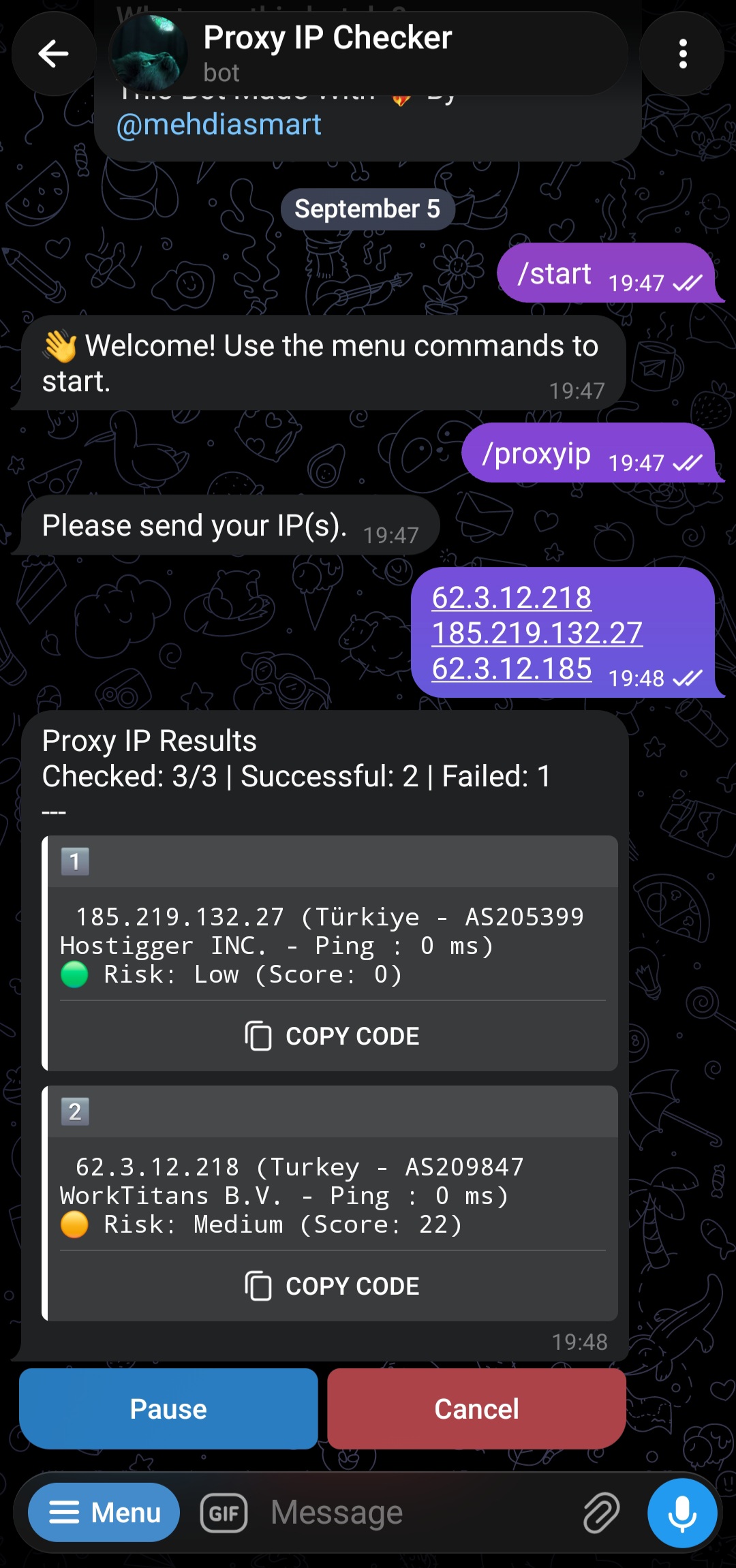
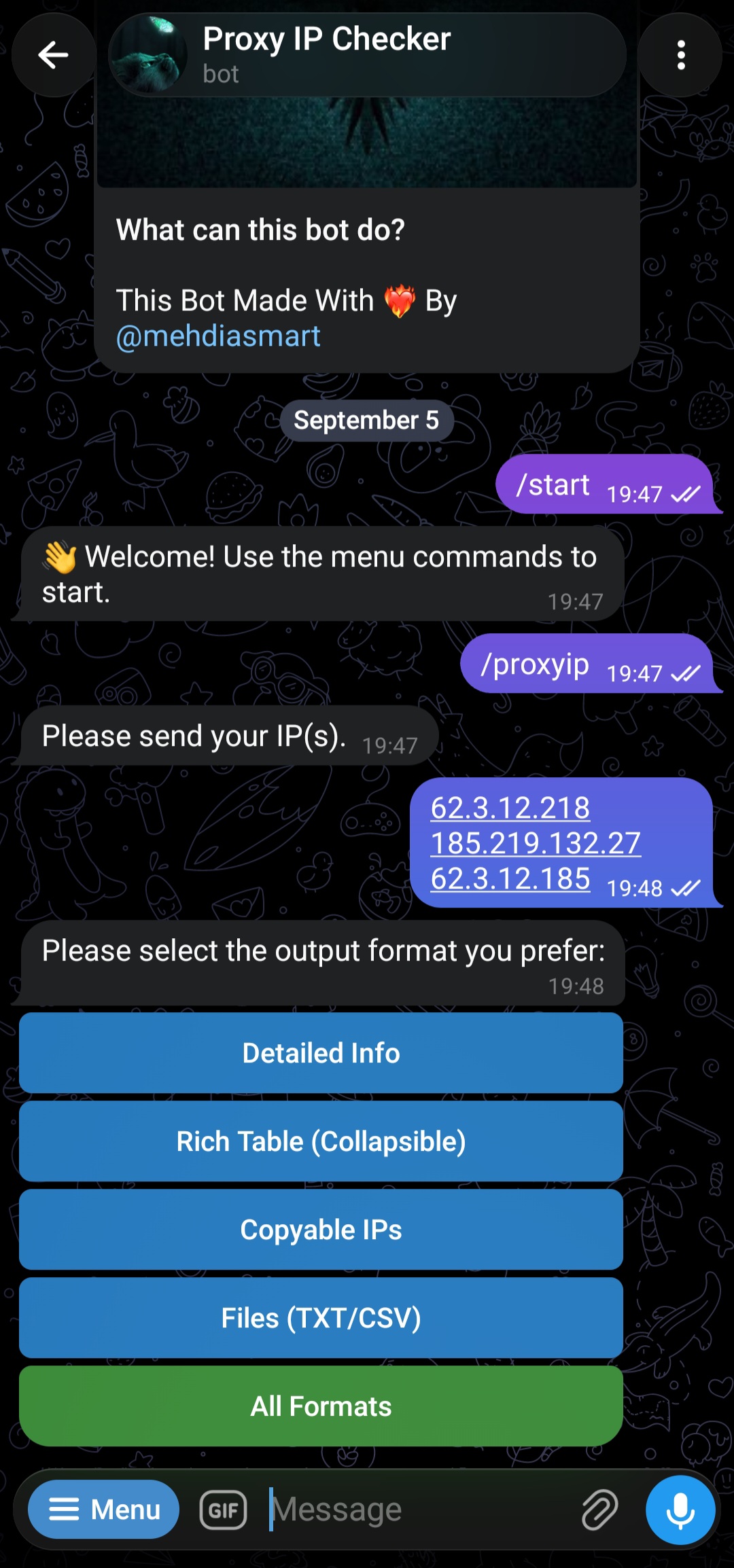
- 5 selectable output formats at the end of each test: Detailed Info, Rich Table (Collapsible), Copyable IPs, Files (TXT/CSV), or All Formats
Posting to a channel/group:
/addchat— multi-step registration of a destination channel/group/deletechat— an interactive menu for removing a registered chat/post— runs any test type in the background and automatically posts the cleaned-up result to the registered destination
Conversational logic: in a private chat you can either pass arguments directly (
/proxyip 1.1.1.1) or go through the conversational flow; in groups only the conversational/reply mode is active (for better stability)User experience: emoji numbering for multi-domain tests, automatic cleanup of temporary messages, and error guidance for invalid commands.
Bot commands
| Command | Purpose |
|---|---|
/start | Start and introduce the bot |
/proxyip <ip[:port]> | Test one or more proxy IPs |
/iprange <cidr> | Test an IP range |
/domain <domain> | Test every IP behind a domain |
/file <url> | Test a list of IPs from a raw file |
/freeproxyip | Show the free-proxy country menu |
/addchat | Register a destination channel/group for /post |
/deletechat | Remove a registered chat |
/post | Run a test and post the result to a registered chat |
/cancel | Cancel any conversation in progress |
Prerequisites
- A Telegram bot token from @BotFather
- A Cloudflare account (free)
- A server/machine with Python 3.8+ and the
screencommand installed - A GitHub account
- A Vercel account (only if you choose the Vercel option for the backend — otherwise you can deploy on Render instead)
- A Scamalytics account — optional (contrary to what the official README says, it's not mandatory; without it, the Worker automatically switches to the public mirror, and the risk score is just a bit less precise)
Deployment guide (4 parts)
Part 1 — Deploy the Backend API
Choose only one of these options (you can also deploy several and list them all in apiUrls so the Worker tries them in parallel — see the "Architecture" section above):
Option A) Vercel (recommended, simpler): Vercel
- Go to the ProxyIP-Checker-Vercel-API repo
- Click the "Deploy" button in that repo's README
- Save the resulting URL (e.g.
https://my-proxy-checker.vercel.app) — you'll need it for Part 3
Option B) Self-host on your own server: VPS
git clone https://github.com/mehdi-hexing/ProxyIP-Checker-API.git
cd ProxyIP-Checker-API
pip install -r requirements.txt

screen -S tcp-api
python main.py --port 8080
# Press Ctrl+A then D to detachResulting URL: http://Your_Server_IP:8080 (make sure the port is open in your firewall)
Option C) Render: Render This same repo (ProxyIP-Checker-API) can also be deployed on Render — it's exactly the same service documented for the CF-ProxyIPChecker project. The full steps (build/start command, env vars, cold-start note) are written there, so they're not repeated here: Render deployment guide
Part 2 — Set up Scamalytics (optional, but recommended)
You can skip this part entirely — the bot still works without it (it uses the public mirror). But for a more accurate risk score, and to avoid depending on someone else's shared service being available, it's better to set up your own dedicated account:
- Sign up at Scamalytics.com with the free plan
- Verify your email and wait for manual API access approval (can take up to 24 hours)
- Once approved, grab your Username and API Key from the Scamalytics dashboard
Part 3 — Configure and deploy the Cloudflare Worker
- Fork this repo (
ProxyIP-Tel-Bot) - In your fork, open the
_worker.jsfile and replace theapiUrlsarray with your Backend API address(es) from Part 1:
const apiUrls = [
  `https://<Your_Vercel_or_Server>/api/v1/check?proxyip=${encodeURIComponent(proxyIPInput)}`,
  `https://<Your_Vercel_or_Server>/api/v1/check?proxyip=${encodeURIComponent(proxyIPInput)}`
];- Commit the changes
- In the Cloudflare dashboard: Workers & Pages → "Create application" → "Pages" → "Connect to Git" → select your fork → set Framework preset to None → Save and Deploy
- In the project settings (Settings → Environment variables), add these variables:
| Variable | Value | Required |
|---|---|---|
SCAMALYTICS_USERNAME | Your Scamalytics username | No (without it, falls back to the public mirror) |
SCAMALYTICS_API_KEY | Your API key | No (same as above) |
SCAMALYTICS_API_BASE_URL | Your dedicated Scamalytics base URL | No |
- Copy the Worker's address (e.g.
https://your-bot-worker.pages.dev) — this becomesWORKER_URLin the next part
Part 4 — Run the Telegram bot
- Clone your fork onto your own server and install the dependencies:
git clone https://github.com/mehdi-hexing/ProxyIP-Tel-Bot.git
cd ProxyIP-Tel-Bot
pip install -r requirements.txt- An important step missing from the original README: before running the bot, open
proxy-ip-bot.pyand replace the line below with your real Worker address (from Part 3) — this value is hardcoded into the code, not an environment variable:
WORKER_URL = "https://Your-Checker.pages.dev" # Replace this with your own Worker URLIf you forget this step, the bot will keep running against the placeholder address and every test will fail.
- Set the
BOT_TOKENenvironment variable:
export BOT_TOKEN="Your_Bot_Token" # Linux/macOS(To make it permanent, add this same line to your ~/.bashrc)
- Run the bot inside a
screensession:
screen -S proxybot
python proxy-ip-bot.py
# Press Ctrl+A then D to detachTo reattach to the session: screen -r proxybot — to stop the bot: reattach and press Ctrl+C.
Important Notes
- The data source for
/freeproxyipis a third-party repo (NiREvil/vless) on GitHub, not data generated by this project itself - If you don't set up a dedicated Scamalytics account (or it goes down), both the risk score and the geolocation data come from the same public mirror of the Cloudflare-Scamalytics project — meaning this bot effectively also depends on that service's availability
Troubleshooting
- All tests fail: you most likely forgot to change
WORKER_URLinproxy-ip-bot.py(Part 4, Step 2) - Risk score isn't shown, or returns an error: this is rare, since there's an automatic fallback to the public mirror. If it happens, check the
SCAMALYTICS_USERNAME/SCAMALYTICS_API_KEY/SCAMALYTICS_API_BASE_URLvalues (if you set them), and also make surecloudflare-scamalytics.pages.dev(the fallback mirror) itself is reachable - The bot stops after the SSH connection drops: make sure you ran it inside
screen, not directly in the terminal /postdoesn't post the result to the channel/group: make sure the bot is an admin in that chat with "Post Messages" permission, and that the chat was properly registered with/addchat
Related links
- This project's repo:
https://github.com/mehdi-hexing/ProxyIP-Tel-Bot - Backend (Vercel):
https://github.com/mehdi-hexing/ProxyIP-Checker-Vercel-API - Backend (Python — Render):
https://github.com/mehdi-hexing/ProxyIP-Checker-API