
Domain-Resolve
What problem was this project built for?
Cloudflare Workers have a fixed cap per execution on the number of Subrequests (outgoing requests). When the Cloudflare-Scamalytics project wanted to check the risk score of a domain, if that domain had more than 50 IPs behind it, trying to fetch the risk of each one individually from Scamalytics would fill up the Worker's SubRequest cap and the whole operation would hit the limit.
Domain-Resolve was built to solve exactly this problem: instead of having the Worker itself resolve the domain's DNS directly and send all the IPs to Scamalytics at once, this service acts as a middleman that does the following:
- Resolves the domain (both A and AAAA records)
- Sorts the IPs by string length and then alphabetically/numerically. (You'll understand why I did this later.)
- Splits them into groups of at most 40, because the Worker's SubRequest limit is 50 SubRequests.
The Cloudflare-Scamalytics Worker then calls the endpoint with fetch, reads the JSON string of the response, and sends each 40-item group separately to Scamalytics for risk scoring — without ever filling up the Subrequest cap.
Although structurally it's a completely separate service (its own repo and deployment), functionally it counts as part of the Cloudflare-Scamalytics infrastructure.
Note
Since we're forced to use this method because of the SubRequest limit on Cloudflare's free plan, the number of requests to our Worker goes up.
How it works
Cloudflare-Scamalytics Worker → fetch → domain-resolve (/resolve?domain=...) → JSON ResponseThe /resolve endpoint
GET /resolve?domain=<domain>Here's an example request so it's easier to understand:
curl "https://domain-resolve.onrender.com/resolve?domain=tr.diam4.ggff.net"Actual sample response:
{
  "success": true,
  "domain": "tr.diam4.ggff.net",
  "total_ips": 29,
  "total_groups": 1,
  "groups": [
    ["3.29.240.49", "45.89.52.85", "130.94.1.150", "..."]
  ]
}Response fields:
| Field | Type | Description |
|---|---|---|
success | boolean | Whether the resolve succeeded |
domain | string | The domain that was checked (after stripping http(s):// and any path) |
total_ips | number | Total number of unique IPs (IPv4 + IPv6) found |
total_groups | number | Number of 40-item groups created |
groups | array of array of string | The IPs, split into groups of at most 40 |
If the domain parameter isn't sent, the response is a 400 error. If the domain has no IPs at all, the response is a 404 along with total_ips: 0 and groups: []. On a DNS error, the response is a 500 along with an error message.
Sorting and grouping logic
IPs are first sorted by string length (character count), and where the length is equal, alphabetically/numerically — for same-length IPv4 addresses, this ordering effectively produces the correct numeric order. The sorted array is then sliced into chunks of 40 (groupSize = 40).
The /health endpoint
GET /healthJust for checking whether the service is alive (health check), with no parameters; returns a simple { "status": "ok" } — useful for monitoring, or for periodic pinging to keep the service from sleeping on the free plan.
Backend of the repo
The service is written in Node.js + Express and uses the built-in dns/promises module to resolve domains; no database or heavy dependency.
"dependencies": {
    "cors": "^2.8.5",
    "express": "^4.19.2"
}Prerequisites
- A GitHub account, whether you want it for forking the repo or for using the repo link I've put below.
- An account on any free Node.js deployment platform (the platform used for deployment is covered further below).
- No specific environment variable needed — the service is ready to run even with zero configuration.
Deployment guide
Since this service is just a plain Express app, it can run on any Node.js platform. Right now (2026), Render is a genuinely free option that doesn't need manual renewal. (For reference: Railway no longer has a permanent free tier, Glitch fully stopped hosting apps as of July 2025, and Vercel is also a bit sensitive and bans accounts.)
Deploying on Render (free, permanent) Render
- Log into the Render dashboard and click New, then click Web Service.
- Connect the
domain-resolverepo from GitHub (or fork it first) - Enter the settings:
- Build Command:
npm install - Start Command:
node server.js - Plan: Free
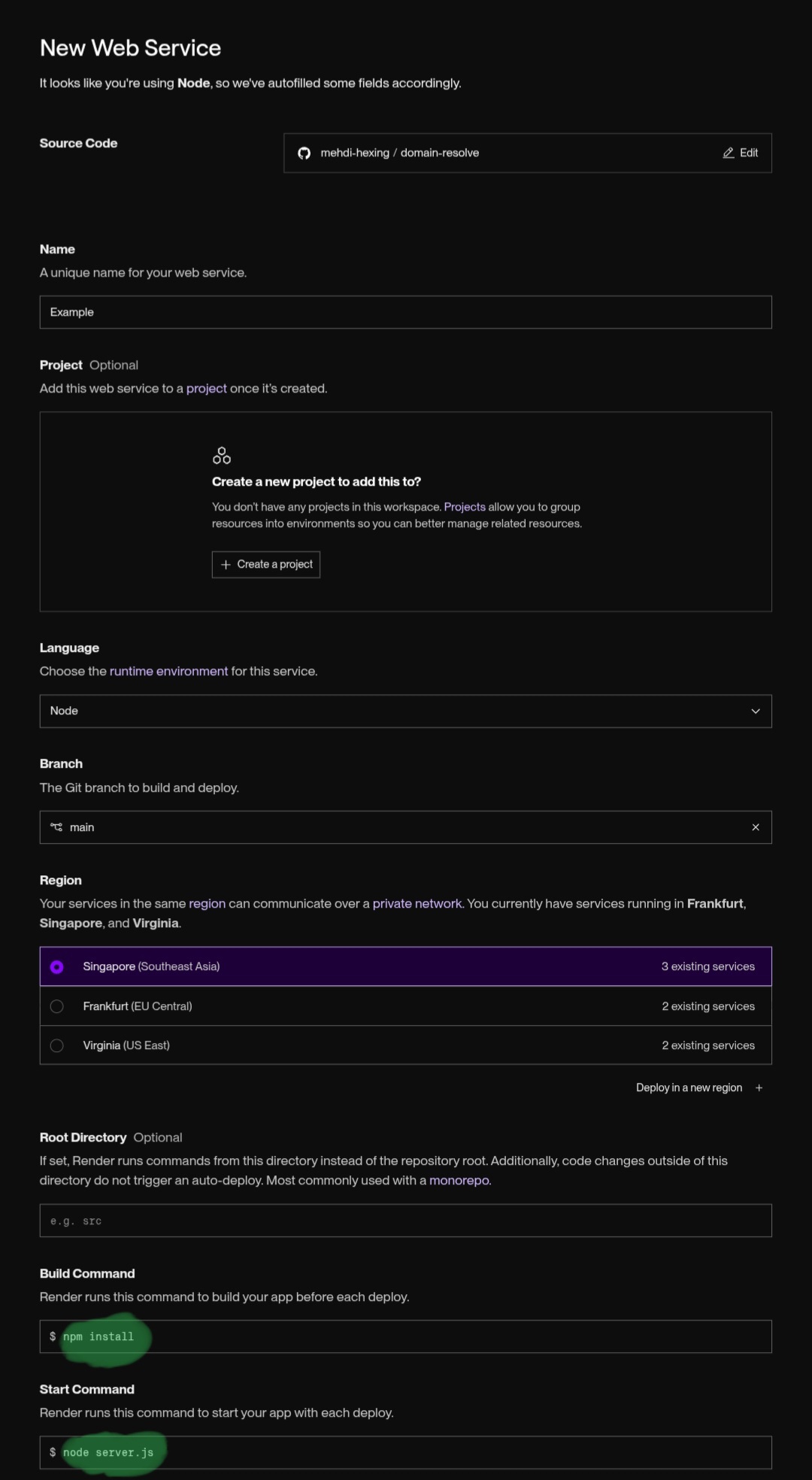
- Click Create Web Service; once the build finishes, you get a permanent HTTPS address (like
https://domain-resolve.onrender.com)
Free Plan Note
After a while of inactivity, the service goes to sleep and the next request has a few seconds of Cold Start. To keep it awake, you can ping the same /health endpoint with a periodic Cron/Ping (say, every 10 minutes).
Testing after deployment
curl "https://<your-deployed-url>/resolve?domain=google.com"
curl "https://<your-deployed-url>/health"Connecting to the Worker
In Cloudflare-Scamalytics, wherever a domain has more than 50 IPs, instead of resolving directly, you just need to send a fetch to this same endpoint:
const res = await fetch(`https://domain-resolve.onrender.com/resolve?domain=${encodeURIComponent(domain)}`);
const data = await res.json();
// data.groups is an array of arrays of at most 40 IPs each;
// send each group separately to Scamalytics for risk scoringTroubleshooting
- 400 error (
Domain query parameter is required): thedomainparameter was forgotten in the URL - 404 error with
total_ips: 0: the domain has no valid A or AAAA record - 500 error: a DNS error (e.g. the domain doesn't exist at all); the exact message is returned in the
detailsfield - The service comes up slowly: normal if it's on Render's free plan (Cold Start); fixable with a periodic ping to the
/healthendpoint.
Related links
- This service's repo:
https://github.com/mehdi-hexing/Domain-Resolve - The main project that uses this service:
https://github.com/mehdi-hexing/Cloudflare-scamalytics